ThunderAuto Autonomous Modes
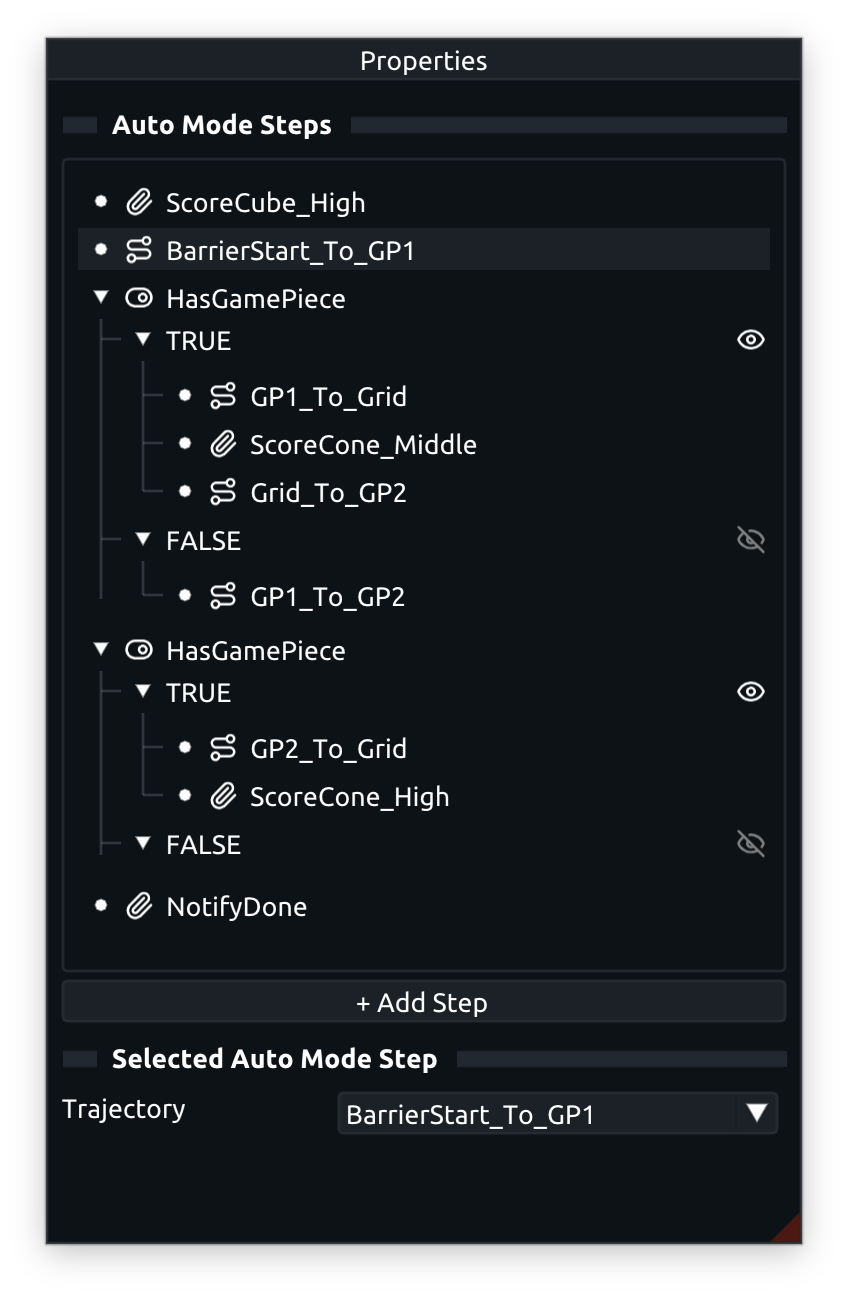
A ThunderAuto Autonomous Mode defines a sequence of steps that the robot will execute in order.
There are four types of steps that can be added to an autonomous mode:
- Trajectory Step: Runs a specified trajectory.
- Action Step: Runs a specified action.
- Boolean Condition Step: Executes a boolean function on the robot, then runs one of two branches of steps depending on the result.
- Switch Condition Step: Executes a switch function on the robot, then runs whichever branch of steps corresponds to the returned value, or the default branch if no match is found.
To create a new autonomous mode, click the + New Auto Mode button in the Auto Modes panel and enter your desired auto mode name in the popup dialog.
You can add steps to the autonomous mode by clicking the + Add Step button in the Properties panel for the selected auto mode, or by dragging actions/trajectories from their respective panels into the auto mode's step list.
To reorder steps, simply drag and drop them within the step list.
Selecting a step in the step list or in the editor will show its properties in the Properties panel, where you can configure the step as needed.
Note
Sequential trajectory steps need to share the same start/end behavior in order to form a continuous, runnable autonomous mode.
For branch steps, all branches must share the same start and end behaviors so that the start and end behavior of the branch step as a whole is well-defined. This is a requirement for all steps except the first and last trajectory-running steps in the auto mode, which can have independent start/end behaviors respectively.
See the Linking Trajectory End Behaviors section for how to automatically link trajectory end behaviors.